
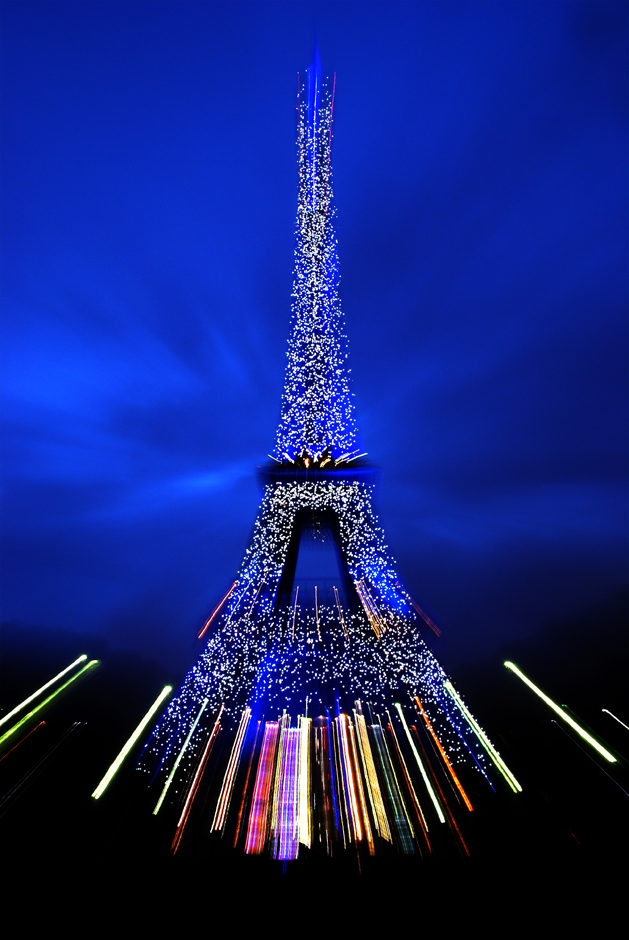
Hi! As I’m sure you’ve figured out, this week’s photo depicts the famous Eiffel Tower in Paris, France. “The City of Light” was shot with an aperture of f/11 and a shutter speed of 3 seconds. I used a Nikon D80 and a Manfrotto 190xb tripod.
If there was a list of the most challenging landmarks to photograph, the Eiffel Tower would definitely be included. With millions of visitors snapping photos of the tower, creating something unique is a huge challenge. I shot this photo on a weekend visit to Paris in late October 2008. I had been to Paris a couple of times before so I already had taken a few stabs at photographing some of the city’s most popular monuments – Notre Dame, Arc de Triomphe, the Louvre, and of course, the Eiffel Tower. But, I hadn’t yet been able to capture anything overly unique or interesting, so for this trip, I made it a goal to get away from the average depiction of such popular scenes.
When I got to the Eiffel Tower, I was surprised to see that it was lit up with blue lights, rather than the usual golden color, and had a circle of stars on one side. Apparently, the blue color represented France’s six month presidency of the European Union. The blue lights ended up being a huge stroke of luck. In my quest for capturing something more unique, the fact that the Tower’s color was completely different than normal was a great start. I set up my camera and tripod to the southwest of the Tower, on one of the sidewalks in Champs de Mars, which is a large public park. I got there before it got too dark so that I would have a variety of lighting options, which ended up being really awesome because I got to see the Tower come to life.
I read somewhere that when shooting landmarks and monuments, you should get your postcard pictures out of the way first. By postcard pictures, I mean those standard shots that every single visitor takes. By getting those postcard shots out of your system, you can then move into experimentation. I played around with shutter speed, aperture, focal length, and I shot a few in black and white. But, I still wasn’t getting what I wanted. Then I remembered learning about a technique of using the zoom lens as a way of stretching the light. I knew almost instantly that I was on to something. A few minutes later, the lights started twinkling so I started my zooming technique again and ended up with this shot. I knew almost immediately that I got what I came for: the Eiffel Tower through my eyes. A lot of people have asked me if I achieved this effect through editing in Photoshop. The answer to that question is a resounding no. The only edit I made to this image was a slight Levels adjustment to bring out the blacks and whites.
Tips: This is a great technique to move towards abstraction. It works best when it’s dark and exposure times are longer, but it is also possible during the day with shorter exposures. I’d recommend experimenting at night. All you need is a tripod and a zoom lens. After mounting your camera on the tripod, set your shutter speed to 3-5 seconds. Zoom in to frame the subject. Press the shutter release button and then slowly and steadily, zoom the lens back out. And that’s it! You can also try starting with the lens zoomed all the way out and then zooming in, and you can try zooming at different speeds. If you want fairly even, solid lines, make sure to zoom at a steady pace.
Thanks for reading! Check back next week for more blogging!
Recent Comments